Handheld vs Desktop Laser Marking Machines: Which Is Right for Your Factory?
News Details
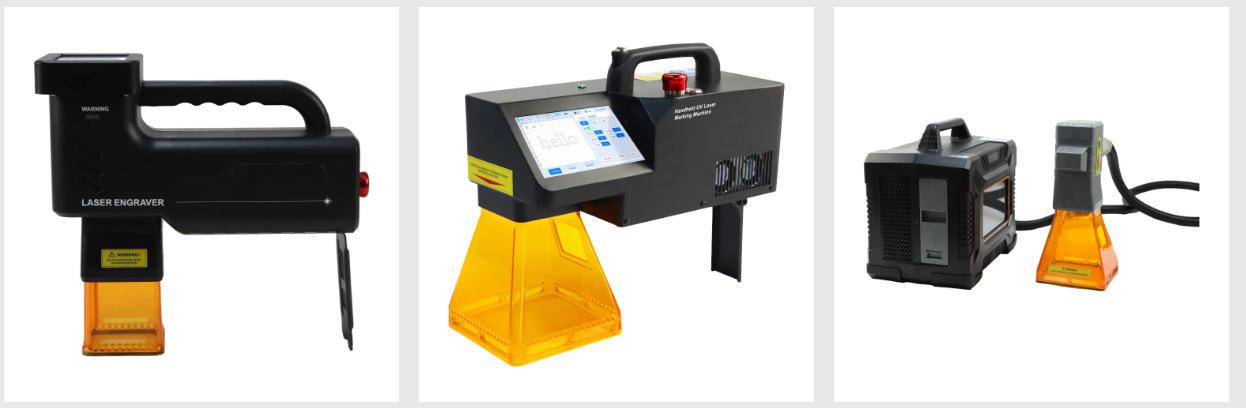
Modern factories need clear, permanent, and fast product marking. Whether you trace parts with QR codes, print serial numbers, or engrave brand logos, laser technology is the best choice today. However, when you buy new equipment, you will face a big question: Should you choose a handheld laser marking machine or a desktop laser engraver?
Both options offer great speed and accuracy, but they suit completely different work settings. To help you make the best decision for your production line, this guide breaks down how these machines work, where they shine, and how to pick the right one for your business.
What Is a Desktop Laser Engraver?
A desktop laser engraver is a stationary system. You place the machine on a workbench or integrate it into an automated conveyor line. During operation, you bring the items to the machine, place them inside the marking area, and let the laser do its job.
These machines are built for stability and high precision. Because the laser head stays fixed in one spot, the beam delivers micro-level accuracy every single time. As a result, desktop systems are perfect for high-volume work, small parts, and complex designs.
Key Advantages of Desktop Laser Systems
-
Unmatched Precision: Fixed heads reduce vibration, which helps you create extremely sharp, detailed marks.
-
High Automation: You can easily link a desktop unit to a conveyor belt for continuous, hands-free production.
-
Safety Enclosures: Many benchtop models feature full enclosures that keep workers safe from stray laser beams and dust.
What Is a Handheld Laser Marking Machine?
A handheld laser marking machine—often powered by a handheld fiber laser—is designed for flexibility and movement. Instead of bringing heavy parts to a fixed station, workers can carry the compact laser head directly to the workpiece.
This portable laser marker opens up new possibilities for factories dealing with large equipment, heavy metal plates, or fixed structures. With a handheld laser marking machine, you can mark items at any angle, anywhere on the shop floor.
Key Advantages of Handheld Laser Systems
-
Total Mobility: Lightweight designs allow operators to mark large or awkwardly shaped items easily.
-
Space Saving: Since these units do not require a large fixed enclosure, they free up valuable floor space in your plant.
-
On-the-Spot Marking: Workers can mark parts during assembly or installation without moving them back and forth.
Key Differences to Consider Before Buying
To pick the right machine for your factory, you need to compare how each option performs under real working conditions.
| Feature / Comparison Factor | Desktop Laser Engraver | Handheld Laser Marking Machine |
| Mobility & Portability | Fixed station; stays in one spot on a workbench or automated line. | Highly portable; workers can easily carry the laser head anywhere. |
| Suitable Part Size & Weight | Ideal for small to medium parts that are easy to lift and position. | Best for large, heavy, bulky, or fixed objects that are hard to move. |
| Production Style | Perfect for continuous, high-speed, and automated batch production. | Great for on-demand, custom, low-volume, or flexible marking tasks. |
| Precision & Stability | Maximum precision due to a stable, vibration-free fixed frame. | High precision, but stability depends slightly on operator handling. |
| Ergonomic Workload | Low operator fatigue for repetitive tasks on small items. | Flexible operation, though holding the unit repeatedly can cause fatigue. |
| Space Requirements | Requires dedicated desk space or a spot on the production line. | Highly compact footprint, easy to store, and frees up shop floor space. |
How to Make the Right Choice for Your Plant
Choosing the right laser system boils down to your primary factory workflow. Here is a quick guide to help you decide:
Choose a Desktop Machine If:
-
You work mostly with small or medium-sized parts.
-
You need automated, high-speed batch production.
-
Your plant layout has extra bench space for fixed work stations.
-
You require maximum laser precision for fine text or tiny graphics.
Choose a Handheld Machine If:
-
Your products are too heavy, long, or bulky to lift onto a desk.
-
You need to mark items outdoors, in warehouses, or across multiple workstations.
-
You want a flexible tool for quick, on-the-spot maintenance marking.
-
Floor space in your facility is strictly limited.
Upgrade Your Factory Today
Both handheld and desktop lasers bring speed, clarity, and long-lasting marks to your industrial operations. By matching the tool to the size of your products and your daily output needs, you can cut down production time, lower labor fatigue, and improve product traceability.
If you want to explore professional, high-grade industrial laser technology, visit Yuanshida. They offer reliable laser solutions tailored to boost efficiency across all types of modern factory environments.


