How to Use a Laser Marking Machine: A Practical Guide
News Details
A laser marking machine can create clear and permanent marks on many products. Manufacturers use it for serial numbers, logos, QR codes, barcodes, product names, and other information.
However, good results require more than turning on the machine. Operators need to prepare the workpiece, choose the right laser marking machine setting, focus the laser, and test the mark before production.
This guide explains how to use a laser marking machine step by step. It also covers basic safety, common settings, and maintenance tips for daily production.
What Do You Need Before Using a Laser Marking Machine?
Before starting, prepare the machine, material, marking file, and work area.
Check the following:
-
Laser marking machine
-
Suitable workpiece
-
Computer and marking software
-
Correct power supply
-
Marking design or text file
-
Safety equipment
-
Clean and stable work surface
First, make sure the machine is suitable for your material.
For example, a fiber laser is commonly used as a laser marking machine for metal. UV laser systems are useful for fine marking on many sensitive materials. CO₂ laser systems are often used for non-metal materials.
Yuanshida provides fiber, UV, and CO₂ laser marking systems in handheld, desktop, and benchtop formats for different applications. (yuanlaser.com)
Step 1: Prepare the Workpiece
Clean the surface before marking.
Oil, dust, rust, and other dirt can affect the final result. Place the workpiece firmly on the marking table so it does not move during processing.
For small parts, use a fixture if necessary.
The position of the workpiece also matters. Keep the marking area within the machine's working range and make sure the surface is suitable for the selected laser.
Step 2: Turn On the Machine
Follow the manufacturer's start-up sequence.
Generally, operators should:
-
Check the power connection.
-
Turn on the main power.
-
Start the required control system.
-
Open the marking software.
-
Check the laser and cooling system.
-
Confirm that the emergency stop is released.
Do not start marking immediately. First, make sure the machine is operating normally.
If you are using a new machine, always follow the user manual supplied by the manufacturer.
Step 3: Import or Create Your Marking Design
Open the marking software and create your design.
Depending on the application, you can add:
-
Text
-
Numbers
-
Logos
-
QR codes
-
Barcodes
-
Serial numbers
-
Simple graphics
Keep the design within the available marking area.
For production work, variable information can also be used. For example, each product can receive a different serial number or batch code.
Step 4: Set the Correct Focus
Correct focus is one of the most important parts of laser marking machine use.
The laser needs to focus correctly on the material surface. If the focus is wrong, the mark may look blurred, weak, or uneven.
Move the workpiece or laser head according to the machine design. Then use the machine's focus function or recommended focus distance.
Before mass production, make a small test mark.
This simple step can prevent large numbers of incorrectly marked products.
Step 5: Choose the Laser Marking Machine Setting
The correct laser marking machine setting depends on the material and the result you want.
Common parameters include:
-
Laser power
-
Marking speed
-
Frequency
-
Pulse width
-
Hatch spacing
-
Number of passes
-
Focus position
Do not assume that one setting works for every material.
For example, metal may need a different combination of power and speed than plastic. A dark mark, deep engraving, and surface color change also require different parameters.
Start with the recommended parameters from the machine supplier. Then make small adjustments based on test results.
Step 6: Run a Test Mark
Always test before starting a large batch.
Place a sample on the work area and run the marking program.
Then check:
-
Mark clarity
-
Mark depth
-
Text size
-
Logo shape
-
QR code readability
-
Position
-
Surface condition
If the result is too light, too dark, too deep, or uneven, adjust the parameters and test again.
Testing is especially important when working with a new material.
Step 7: Start Production Marking
Once the test result is correct, begin production.
Place each workpiece in the same position. If possible, use a fixture to keep the location consistent.
Then start the marking program.
During production, watch for unusual changes. For example, a sudden change in marking color or depth may indicate an incorrect parameter, focus problem, dirty lens, or other machine issue.
How to Use a Laser Marking Machine for Metal
A laser marking machine for metal is widely used in industrial production.
Common materials include:
-
Stainless steel
-
Aluminum
-
Carbon steel
-
Brass
-
Copper
-
Titanium
Fiber laser systems are commonly selected for these applications.
When marking metal, operators should pay attention to the desired result. Surface marking, color marking, and deep engraving do not use the same parameters.
For example, a production line that only needs serial numbers may use a different setting from a manufacturer that needs deep marks on mechanical parts.
How to Use a 30W Laser Marking Machine
A laser marking machine 30W model can be suitable for many general marking applications. However, 30W does not mean that every material should use the same settings.
The correct parameters still depend on:
-
Material type
-
Material thickness
-
Marking speed
-
Required depth
-
Mark size
-
Production volume
Therefore, test the material first rather than choosing settings based only on laser power.
How to Use a Portable Laser Marking Machine
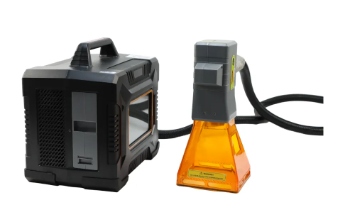
A laser marking machine portable system can be useful when products are large, heavy, or difficult to move.
For example, operators may need to bring the laser to a large metal component instead of moving the component to a fixed marking station.
Before marking, make sure the machine is stable and the laser head is correctly positioned.
Also check the focus after moving the machine. Even a small change in working distance can affect the marking result.
Laser Marking Machine for Construction Applications
A laser marking machine for construction can support product identification in the construction and hardware industries.
Possible applications include:
-
Metal tools
-
Hardware components
-
Fasteners
-
Pipes
-
Steel parts
-
Equipment plates
-
Product numbers
-
Manufacturer logos
The right system depends on the material, component size, marking depth, and production process.
For large components, portable or handheld systems may provide more flexibility. For small parts, desktop or benchtop systems can be easier to operate.
How to Maintain Your Laser Marking Machine
Knowing how to maintain your laser marking machine is important for stable production.
After daily use, clean the work area and remove dust or debris. Check the lens and keep the optical components clean according to the manufacturer's instructions.
Also inspect:
-
Cooling and ventilation
-
Power cables
-
Data cables
-
Laser head
-
Emergency stop
-
Machine connections
Do not touch optical surfaces with bare fingers. If a component is damaged or the machine shows an unusual error, contact a qualified service team.
Regular maintenance can help reduce downtime and extend equipment life.
How to Choose the Right Laser Marking Machine
Before comparing laser marking machine price, look at the complete application.
Consider:
Material: What materials will you mark?
Marking result: Do you need surface marking, color marking, or deep engraving?
Production volume: Will the machine run occasionally or every day?
Part size: Are the products small or oversized?
Machine type: Would a desktop, benchtop, handheld, or portable system be more suitable?
Technical support: Can the supplier provide installation, training, spare parts, and after-sales support?
When comparing laser marking machine suppliers, these factors can be more useful than price alone.
Final Checklist Before Marking
Before every production run, check:
-
Workpiece is clean and stable
-
Correct marking file is loaded
-
Laser focus is correct
-
Material and parameters match
-
Test mark has been approved
-
Lens and work area are clean
-
Cooling and ventilation are working
-
Safety procedures are in place
A simple checklist can help reduce marking errors and production waste.
Choose the Right Laser Marking Solution
Learning how to use a laser marking machine starts with understanding your material and application. Next, set the focus, choose suitable parameters, test the result, and then begin production.
Yuanshida offers handheld, desktop, and benchtop laser marking machines, including fiber, UV, and CO₂ systems. Its product range is designed for different materials and industrial marking needs.
Whether you need a laser marking machine for metal, a portable system, or a solution for construction components


