Portable Handheld Laser Marking Machine: 20W to 100W
News Details
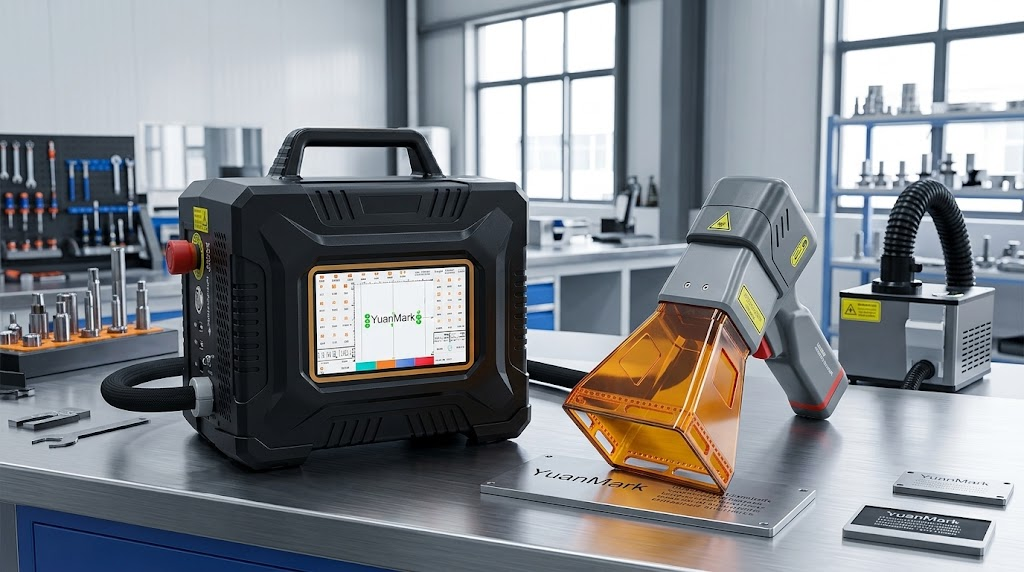
Large metal parts can be difficult to move. In many factories, operators need to bring these parts to a fixed laser marking station. This can take time and add extra work.
A portable handheld laser marking machine offers a simpler option. Instead of moving the workpiece, you can move the laser to the workpiece.
This design works well for large pipes, machines, tools, auto parts, and other industrial products. It also helps when you need to mark parts in different areas of a factory or at a job site.
Today, portable laser marking machines are available in different power levels and setups. Common options range from 20W to 100W. The right choice depends on your material, marking depth, speed, and work area.
How Much Laser Power Do You Need?
Laser power affects marking speed and marking depth. However, more power is not always the best choice.
You should also consider the material and the type of mark you need.
20W to 30W Models
A 20W or 30W laser can work well for many common marking jobs.
For example, these models can mark:
-
Stainless steel parts
-
Aluminum parts
-
Plastic products
-
Tools
-
Small machine parts
-
Product identification codes
They are a good choice when you mainly need clear logos, names, serial numbers, or QR codes.
50W to 100W Models
Higher-power models can provide more processing power. They can also help reduce marking time for some applications.
A 100W handheld laser may suit users who need faster processing or deeper marks on suitable materials.
However, the final result depends on more than laser power. Material type, surface condition, lens choice, speed, and laser settings can all affect the result.
For this reason, it is best to choose the laser power after testing your actual material.
Key Features of a Portable Laser Marking Machine
A good portable laser marker should do more than produce a clear mark. It should also be easy to carry, simple to operate, and suitable for daily industrial use.
1. Fixed-Focus Protective Cover
Setting the correct focus can take time on a traditional laser marking system.
A fixed-focus design makes this step easier. The operator can place the protective cover against the workpiece and start the marking process.
The cover also helps protect the operator during normal use. In addition, the observation window makes it easier to see the marking area.
A built-in fan can help remove dust and fumes from the working area. This can also help keep the internal optical parts cleaner.
2. 14,500 mAh Replaceable Battery
Power access can be a problem when you work away from a fixed production line.
The machine uses a 14,500 mAh lithium battery. Under suitable working conditions, the battery can support about 4 to 6 hours of continuous use.
The replaceable battery design gives users more flexibility. You can prepare an extra battery for longer jobs. You can also connect the machine to a power source when needed.
This makes the system useful for mobile marking work.
3. Strong and Compact Housing
A mobile laser marker may move between different work areas every day. Therefore, the housing needs to handle normal workshop use.
The main body uses high-impact ABS material with internal support. The design helps protect the machine during daily operation.
The protective hood uses molded acrylic. It provides a clear view of the marking area while adding another layer of protection.
The compact design also makes the machine easier to carry than a large fixed marking system.
4. Simple Preset Settings
Not every operator has experience with laser software.
For this reason, the system provides preset settings for common materials and marking jobs. Users can choose a suitable setting, load their design, and adjust the main parameters.
This can reduce setup time for regular jobs.
It also makes the machine easier for new operators to learn.
Four Configurations for Different Jobs
Different workpieces need different setups. A portable laser marking machine can support several working modes.
| Operating Mode | Best For | Main Benefit |
|---|---|---|
| Handheld Standard | Large pipes, machines, and outdoor equipment | Easy to move and position |
| Magnetic Mount | Steel plates and vertical surfaces | Keeps the laser stable |
| Desktop Convertible | Small parts and batch jobs | Provides a stable work area |
| Fully Enclosed | Indoor work and added protection | Provides a more enclosed marking area |
These options give users more freedom when setting up a marking process.
For example, you can use the handheld mode for a large machine. Then, you can switch to a desktop setup for small parts.
The system also supports different marking areas, including 50 × 50 mm, 100 × 100 mm, and 150 × 150 mm.
You can choose the field size based on your logo, text, QR code, or other marking design.
Flexible Control Options
Production teams often need to change marking content. For example, one batch may need a new serial number while another batch may need a different product code.
The machine supports several ways to enter and control marking data:
-
Color touchscreen with stylus
-
Mobile control through Bluetooth or Wi-Fi
-
USB connection to a PC
-
Mouse and keyboard input
-
Barcode scanning
-
QR code scanning
These options can make daily marking work faster.
For example, an operator can scan a code and use the data for product identification. This can help reduce manual data entry.
It also works well for serial numbers, batch numbers, logos, and other variable information.
Applications of a Mobile Metal Laser Marker
A mobile metal laser marker can help when the workpiece is too large, too heavy, or too difficult to move.
Here are some common applications.
Auto Parts
Auto parts often need permanent identification. A laser can mark part numbers, logos, serial numbers, and other product information.
Industrial Machinery
Large machines may be difficult to move to a fixed marking station. A handheld system lets operators bring the laser to the machine.
You can mark model numbers, equipment IDs, and maintenance information directly on the equipment.
Metal Pipes
Pipes can be long and heavy. A portable system makes it easier to mark product information on the pipe surface.
This can include batch numbers, specifications, and company logos.
Tools and Hardware
Tools often need clear and permanent marks. A laser can mark names, model numbers, logos, and other information without the need for labels.
Custom Products
Small manufacturers and custom fabricators may handle many different products.
A portable laser marker gives them more flexibility. Operators can change the marking content from one order to the next.
Portable Laser Marking Machine vs. Fixed Laser Marker
Both portable and fixed laser marking machines have their own advantages.
A fixed system works well for high-volume production. The machine stays in one place, and operators can load parts into the marking area.
A portable system offers more freedom. It works better when parts are large or when the marking location changes often.
For example:
| Requirement | Better Choice |
|---|---|
| High-volume small parts | Fixed laser marker |
| Large machine parts | Portable laser marker |
| Long pipes | Portable laser marker |
| Fixed production line | Fixed system |
| Field marking | Portable laser marker |
| Different work areas | Portable laser marker |
Therefore, buyers should choose the machine based on their production process, not only the laser power.
Why Choose Jinan Yuanshida Laser?
When buying a laser marking machine, the supplier matters as much as the machine.
Jinan Yuanshida Laser has more than 25 years of experience in power electronics and laser equipment.
The company handles product design, manufacturing, testing, and quality control. This helps keep the production process under control.
Safety and Product Certifications
Depending on the machine configuration and market requirements, the products can be supplied with relevant documents and certifications, including CE, FCC, FDA, MSDS, and UN38.3.
These documents can help buyers check product safety and transport requirements.
Complete Accessories
The machine can also come with useful accessories for daily work.
These may include:
-
Safety goggles
-
Positioning plates
-
Cleaning wipes
-
Stylus pen
-
Mounting hardware
These accessories help users start work with less preparation.
How to Choose the Right Handheld Fiber Laser Engraver
Before buying a handheld fiber laser engraver, consider the following points.
First, check your materials. Different materials need different laser settings.
Second, check the marking depth. If you need only logos and serial numbers, a lower-power model may be enough. If you need deeper engraving, you may need more power.
Third, check the workpiece size. Large parts may require a handheld or magnetic setup.
Fourth, consider your working location. If you often work away from a power outlet, a battery powered laser engraver can offer more flexibility.
Finally, think about production speed. If you have a large number of parts to mark, a higher-power model may help improve productivity.
Find the RightPortable Laser Marking Machine
A portable laser marking machine can make industrial marking easier when workpieces are large, heavy, or difficult to move.
From 20W to 100W, different power options can meet different marking needs. You can also choose from handheld, magnetic, desktop, and enclosed configurations.
The best machine depends on your material, marking depth, workpiece size, production speed, and working environment.
Jinan Yuanshida Laser provides different portable laser marking solutions for industrial and commercial applications. Contact the team to discuss your material and marking requirements and find a suitable configuration.


